Machine
Send a job
Send to process in the editor saves the drawing as a project and hands it to the Process screen. Process is the only screen that talks to the machine.
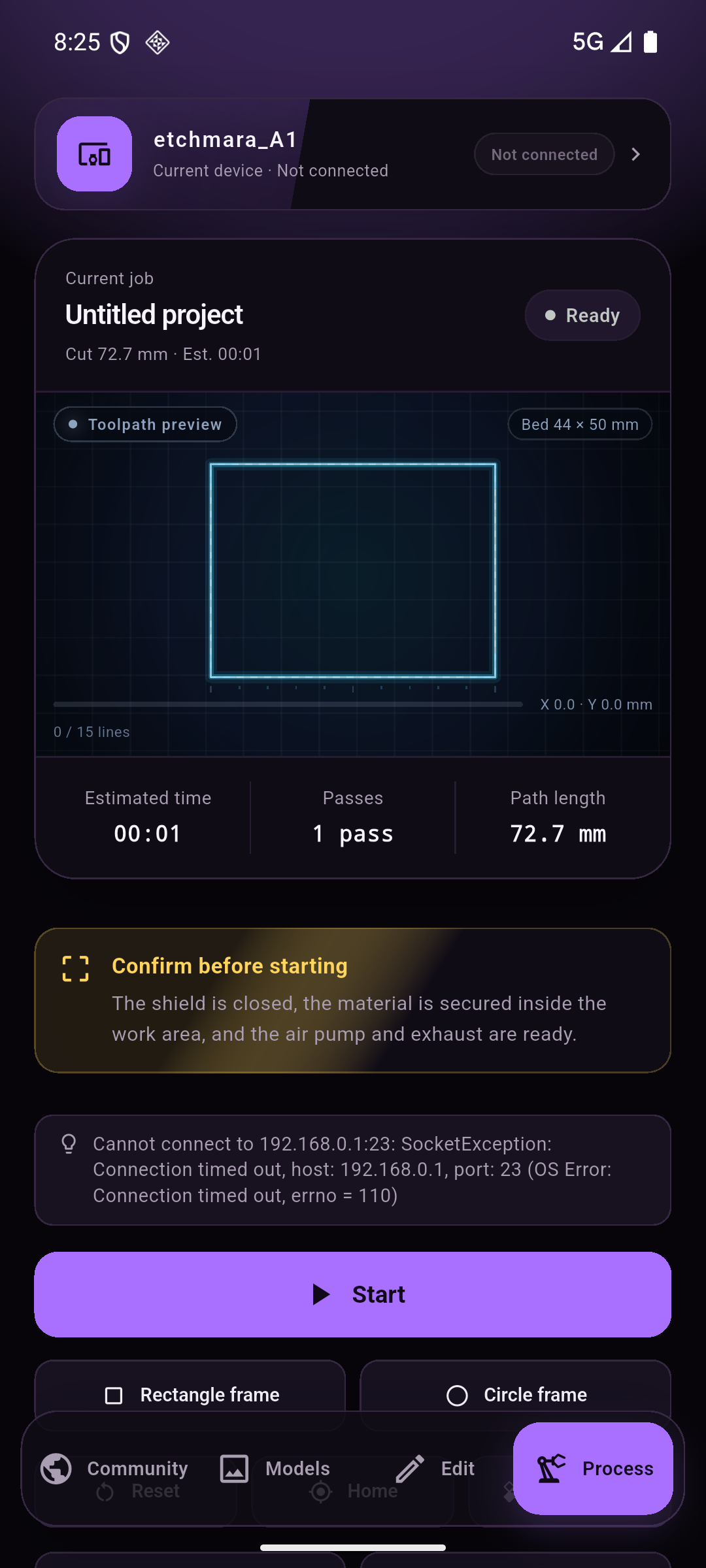
What the job card shows
| Field | Meaning |
|---|---|
| Job name | The project name; tap it in the editor to rename. |
| Toolpath preview | The real path the laser will follow, drawn on the machine's work area (Bed 44 × 50 mm here). |
| Estimated time / passes / path length | Computed from the layer parameters. Cut 72.7 mm · Est. 00:01 in the screenshot is one pass around a rectangle. |
| Progress line | 0 / 15 lines — how much of the job the controller has acknowledged. |
Before you start
The yellow card is a physical checklist, not a legal disclaimer:
- the shield is closed,
- the material is secured inside the work area,
- the air pump and exhaust are running.
Buttons
| Button | Action |
|---|---|
| Start | Sends the job and starts cutting. Requires a live connection to the controller. |
| Rectangle frame / Circle frame | Traces the job's bounding box (or a circle around it) so you can check placement on the material. |
| Reset / Home | Controller reset, and a homing cycle. |
| Clear alarm | Sends a soft reset after an alarm. |
| Write to SD card / Run from SD card | Copies the job to the card in the controller and runs it from there — the path to use when you are not on the machine's network. |
| Run log | What the controller said, line by line. |
If the job card says “No job selected”
Process stays empty until a drawing has been sent. Finish the drawing in Edit
and tap Send to process — sending an empty project produces an empty job
(0 entities, 0 × 0 mm) and the card stays blank.
Connection messages
The line above Start is the live link report. A timed-out attempt looks like this:
Cannot connect to 192.168.0.1:23: SocketException:
Connection timed out, host: 192.168.0.1, port: 23 (OS Error:
Connection timed out, errno = 110)
That means the controller is not reachable at that address right now. Open the device bar and run the network check — it will tell you whether you are on the wrong network, off the hotspot, or the machine is simply off.